Creating a professional website is no longer difficult or expensive. Today, anyone can build a modern, responsive, and SEO-friendly website without advanced coding skills. If you are wondering how to design a website using WordPress, this complete guide will help you step by step.
WordPress powers millions of websites worldwide because it is flexible, beginner-friendly, and highly customizable. Whether you want to create a business website, blog, portfolio, or eCommerce store, WordPress gives you all the tools you need.
In this guide, you will learn:
- How to design a website using WordPress from scratch
- How to choose themes and plugins
- SEO and mobile optimization tips
- Common mistakes to avoid
- Exact strategies to make your website successful
Let’s get started.
Why Choose WordPress for Website Design?
Before learning how to design a website using WordPress, it is important to understand why WordPress is so popular.
1. Easy to Use
WordPress has a beginner-friendly dashboard that allows users to manage content, images, and pages easily.
2. Highly Customizable
You can customize:
- Website layout
- Colors
- Fonts
- Headers
- Menus
- Contact forms
without coding knowledge.
3. SEO-Friendly
WordPress is designed with SEO in mind. With the right plugins and optimization, your website can rank higher on Google.
4. Thousands of Themes and Plugins
You can add:
- Booking systems
- Contact forms
- Online stores
- SEO tools
- Security features
using plugins.
5. Mobile Responsive
Most WordPress themes automatically adjust for mobile devices.
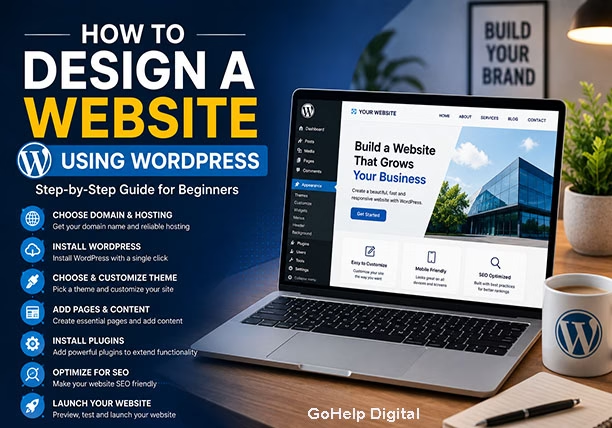
Step 1: Choose a Domain Name and Hosting
The first step in learning how to design a website using WordPress is choosing a domain name and hosting provider.
Tips for Choosing a Domain Name
Your domain should:
- Be easy to remember
- Match your business name
- Be short and simple
- Avoid special characters
Example:
- yourbusiness.com
- yourbrand.in
Choosing the Right Hosting
A good hosting provider improves:
- Website speed
- Security
- Performance
- SEO rankings
Look for hosting that offers:
- Free SSL certificate
- Daily backups
- WordPress support
- Fast loading speed
Step 2: Install WordPress
Most hosting companies offer one-click WordPress installation.
After installation, you can access your dashboard at:
yourwebsite.com/wp-admin
Inside the dashboard, you can:
- Create pages
- Upload images
- Install plugins
- Customize design
Step 3: Select the Perfect WordPress Theme
One of the most important parts of how to design a website using WordPress is choosing the right theme.
A theme controls:
- Website appearance
- Layout
- Design structure
- Mobile responsiveness
How to Choose the Best WordPress Theme
Choose a theme that is:
- Fast loading
- SEO-friendly
- Mobile responsive
- Easy to customize
- Regularly updated
Popular Types of WordPress Themes
Business Themes
Best for:
- Agencies
- Service providers
- Corporate websites
Blog Themes
Best for:
- Personal blogs
- News websites
- Content creators
eCommerce Themes
Best for:
- Online stores
- Product websites
Step 4: Customize Your Website Design
Now comes the exciting part of how to design a website using WordPress — customization.
Go to:
Appearance → Customize
Here you can modify:
- Logo
- Colors
- Fonts
- Menus
- Homepage layout
Important Design Elements
1. Header Design
Your header should include:
- Logo
- Navigation menu
- Call-to-action button
2. Homepage Design
Your homepage should clearly explain:
- Who you are
- What you offer
- Why visitors should trust you
Include:
- Contact details
- Social media links
- Copyright text
- Quick navigation links
Step 5: Create Important Pages
A professional website needs essential pages.
Must-Have Pages
Home Page
Your primary landing page.
About Us
Explain your business story and mission.
Services Page
Describe your services clearly.
Contact Page
Add:
- Contact form
- Phone number
- Map location
Blog Page
Helps improve SEO and organic traffic.
Step 6: Install Essential Plugins
Plugins extend WordPress functionality.
Best Plugins for WordPress Website Design
SEO Plugin
Helps optimize your website for Google.
Security Plugin
Protects your website from hackers.
Cache Plugin
Improves website speed.
Contact Form Plugin
Allows visitors to contact you.
Backup Plugin
Creates automatic backups.
Step 7: Optimize Website Speed
Website speed is critical for:
- SEO rankings
- User experience
- Conversion rates
Tips to Improve WordPress Speed
Use Lightweight Themes
Avoid heavy themes with unnecessary features.
Compress Images
Large images slow down your website.
Use Caching
Caching reduces loading time.
Minimize Plugins
Too many plugins can affect performance.
Step 8: Make Your Website Mobile-Friendly
Most users browse websites on mobile devices.
Google also prioritizes mobile-friendly websites in search rankings.
Mobile Optimization Tips
- Use responsive themes
- Avoid large popups
- Keep buttons easy to click
- Optimize images for mobile
Step 9: Improve SEO for Your WordPress Website
Learning SEO is essential when understanding how to design a website using WordPress.
Without SEO, your website may not rank on Google.
WordPress SEO Best Practices
Use SEO-Friendly URLs
Good URL example:
yourwebsite.com/web-design-services
Bad URL example:
yourwebsite.com/page?id=123
Every page should have:
- Clear title
- Focus keyword
- Natural wording
Write Meta Descriptions
A meta description improves click-through rates.
Use Internal Linking
Link related pages and blogs together.
Add Alt Text to Images
Helps:
- SEO
- Accessibility
- Google image ranking
Step 10: Create High-Quality Content
Content is one of the biggest factors in website success.
Your content should:
- Solve user problems
- Be easy to read
- Include relevant keywords
- Provide value
Best Content Types for WordPress Websites
Blog Articles
Great for SEO and traffic.
Case Studies
Build trust and credibility.
Service Pages
Convert visitors into customers.
FAQs
Improve user experience and SEO.
Common Mistakes to Avoid in WordPress Website Design
1. Using Too Many Plugins
Too many plugins can slow down your website.
2. Ignoring Mobile Design
A poor mobile experience increases bounce rate.
Visitors should easily find information.
4. Slow Website Speed
Slow websites lose visitors and rankings.
5. Weak Call-to-Action
Every page should encourage users to:
- Contact you
- Buy products
- Fill out forms
If you want your website to grow fast, follow these proven strategies.
1. Focus on SEO Content
Publish:
- Tutorials
- Guides
- Problem-solving blogs
This helps attract organic traffic from Google.
2. Use High-Quality Visuals
Add:
- Images
- Infographics
- Videos
Visual content increases engagement.
3. Improve User Experience
A clean website design improves:
- Time on site
- Conversions
- SEO rankings
4. Build Fast-Loading Pages
Speed affects:
- User retention
- Search rankings
Promote blogs on:
6. Add Lead Generation Forms
Capture visitor details using:
- Contact forms
- Newsletter forms
- Free downloads
7. Use Clear CTAs
Examples:
- Get Started
- Contact Us
- Request Quote
Best Website Design Tips for Beginners
Keep the Design Simple
Avoid cluttered layouts.
Use Readable Fonts
Choose clean and professional typography.
Maintain Consistent Branding
Use the same:
- Colors
- Fonts
- Style
across all pages.
Users should reach any page easily.
How Much Does It Cost to Design a WordPress Website?
The cost depends on:
- Theme type
- Plugins
- Hosting
- Developer charges
Basic Website Cost
Suitable for:
- Blogs
- Portfolio sites
- Small businesses
Professional Website Cost
Suitable for:
- Companies
- Agencies
- eCommerce websites
DIY vs Hiring a Professional
DIY WordPress Website
Best for:
- Beginners
- Small budgets
Professional Web Designer
Best for:
- Custom design
- Advanced SEO
- Better conversions
Future of WordPress Website Design
WordPress continues to evolve with:
- AI integration
- Faster builders
- Better security
- Improved performance
Businesses prefer WordPress because it offers flexibility and scalability.
Final Thoughts
Now you understand how to design a website using WordPress step by step.
WordPress is one of the best platforms for creating:
- Business websites
- Blogs
- eCommerce stores
- Portfolio websites
The key to success is combining:
- Great design
- Fast speed
- SEO optimization
- High-quality content
If you focus on user experience and SEO, your WordPress website can become a powerful tool for business growth.
Conclusion
Learning how to design a website using WordPress is one of the most valuable skills for businesses and entrepreneurs.
With the right theme, plugins, SEO strategy, and content, you can create a professional website that attracts visitors and generates leads.
Start simple, focus on quality, and continuously improve your website over time.